OpenAI
Connect your own OpenAI API key. Stream answers and use schema tools with a compatible model.
Uses the OpenAI Responses API.
OCEAN AI / BRING YOUR OWN MODEL
Build a query, untangle unfamiliar SQL or plan your next change. Ocean AI works beside your editor, with the schema context and model you choose.
OpenAI · Claude · LM Studio · Ollama · Compatible endpoints
“Help me find customers who haven’t placed an order this month.”
Ask for a query, review the explanation, then inspect the proposed SQL.
BYOM / BRING YOUR OWN MODEL
Save provider profiles, discover available models and switch from the assistant. Choose a cloud API or a model running on your own machine.
Connect your own OpenAI API key. Stream answers and use schema tools with a compatible model.
Uses the OpenAI Responses API.Bring an Anthropic API key for Claude, with streamed replies and optional schema inspection tools.
Uses the native Anthropic Messages API.Connect to your LM Studio server and choose an available model. An API token is optional.
Choose a locally running model for local inference.Use your Ollama server and select a model available on that endpoint.
A local endpoint can still be configured to use a cloud model.Supply a compatible Chat Completions endpoint, model ID and credentials if needed.
Chat and tool support depend on the endpoint and model.Your model, your provider account. SQL Ocean is free for 90 days, then £5/month. Cloud AI usage is billed separately by your provider. OpenAI and Claude use API keys; ChatGPT and Claude subscription sign-in are not supported in the app.
FROM QUESTION TO QUERY
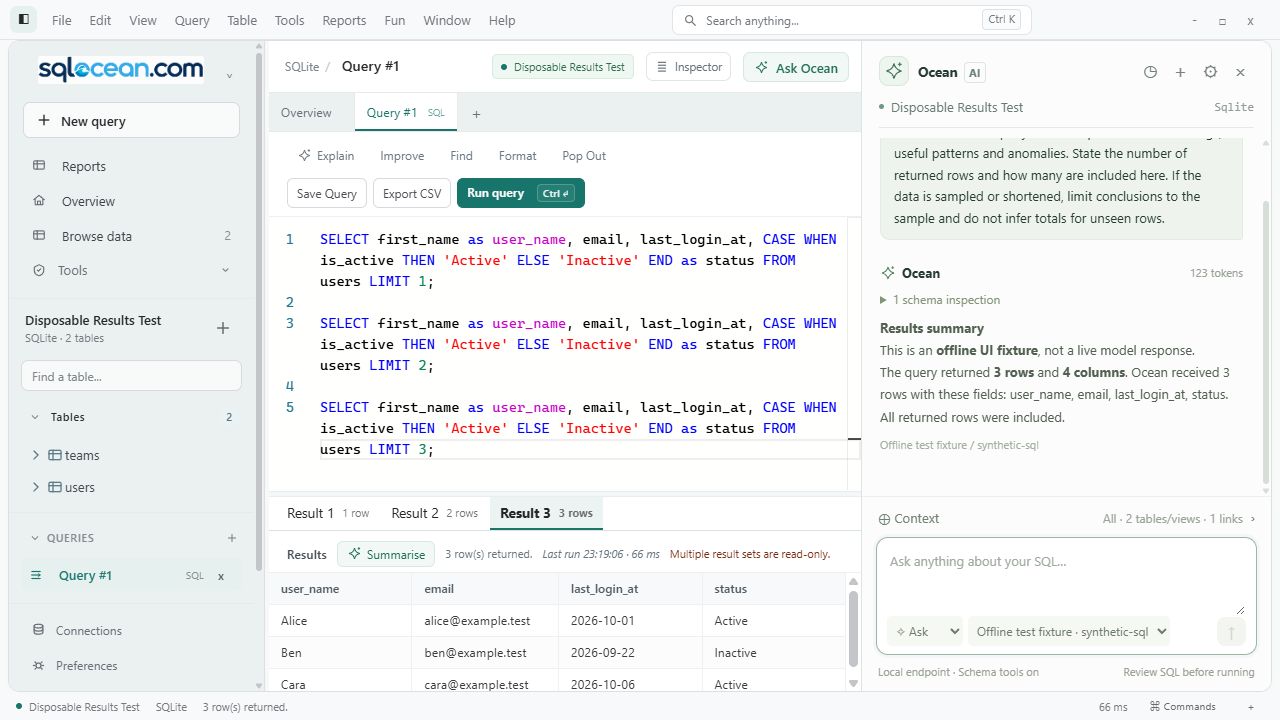
A resizable assistant, streamed answers and conversation history organised by database. Stop a response, retry, or start a fresh chat.
Build a query from a question, explain SQL step by step or ask for improvements. Include the current editor SQL when you want the model to review it.
Use Plan mode to work through a proposed database change, including verification and rollback steps, before taking action.
Open suggested SQL in a new query, or compare it with the original in an inline diff before replacing it. Running the query remains your action.
Choose Summarise on the selected results tab to send a bounded snapshot to your model. It works with the returned rows without rerunning the query.
 View full size ↗
CONTEXT YOU CAN SEE
The assistant starts with the definitions visible to your database account. You can narrow the table selection and choose whether to include editor SQL.
Schema discovery refreshes before each message. PostgreSQL covers visible non-system schemas, MySQL the current database and SQLite the main database. MongoDB and demo definitions are labelled as limited. Undeclared relationships remain unknown.
Up to 50 returned rows and 40 columns, within a 20,000-character JSON limit. Long cells may be shortened. The app labels sampling, and the attachment is retained in encrypted chat history. The sample describes returned results, not necessarily the whole table.
No. It proposes SQL for you to review. You choose whether to open it in a new tab or accept a replacement, then use the editor’s Run control. Interrupted answers cannot be applied.
Only when you choose a model that actually runs locally. Cloud profiles send the attached context to your selected provider. A localhost server can also be configured with a cloud model; SQL Ocean does not silently switch providers.
Save & test discovers available models. A completed chat confirms inference access. Compatibility and schema-tool support depend on the model and endpoint you choose.
Ocean AI lives alongside the SQL editor, results and your saved connections.
Explore the whole workspace